Flask-Peewee admin
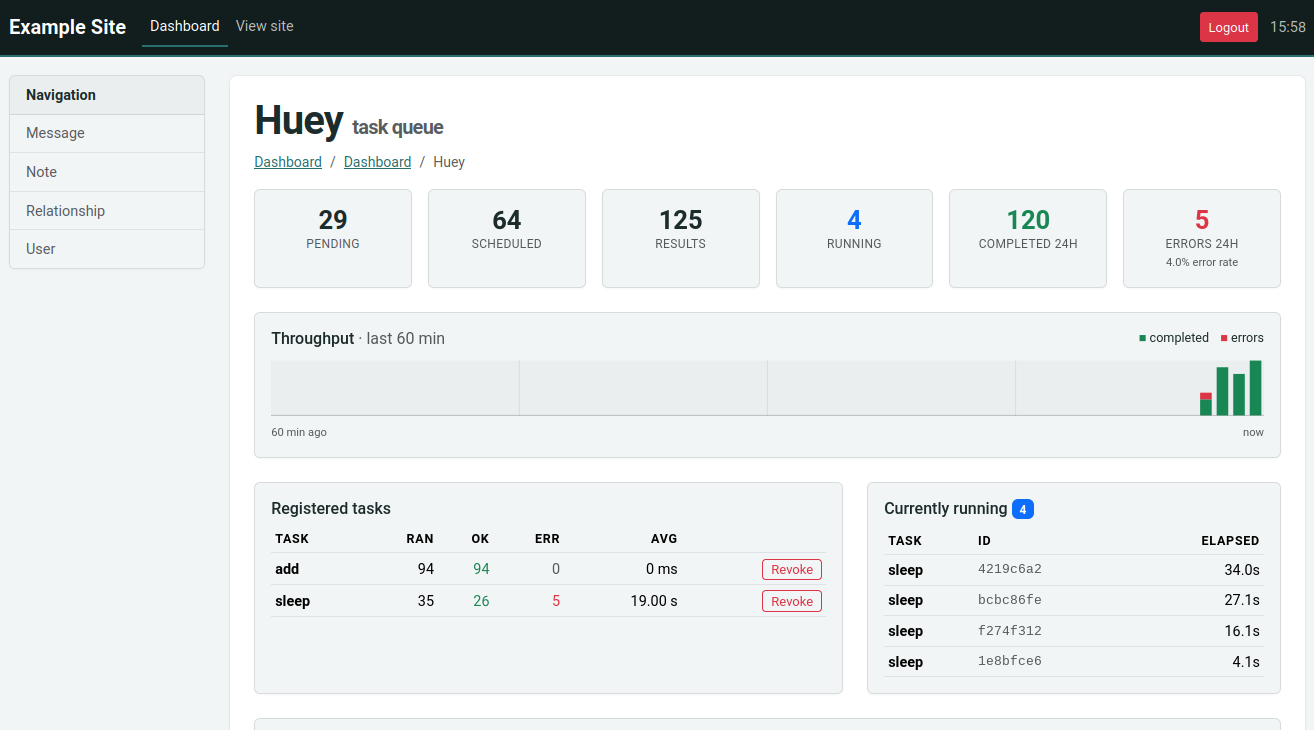
HueyPanel adds a huey monitoring dashboard to the admin site
provided by flask-peewee. The
dashboard shows live queue depths, currently-running tasks, recent events,
per-task throughput and error-rates, and provides controls for revoking or
restoring tasks and flushing the queue, schedule, results or locks.
The panel is a front-end for the task statistics engine, so its data comes from two places:
enable_stats()runs in the consumer and records task signals (executing, complete, error, …) into the stats database. See Task statistics for details.HueyPanelruns in your web application and renders that recorded history alongside live queue introspection.
Both point at the same database, so it must be reachable by both processes.
Registering the panel
Register the panel with your flask-peewee Admin instance, passing
the huey instance as an extra argument:
from huey.contrib.flask_admin import HueyPanel

admin.register_panel('Huey', HueyPanel, huey)
By default the panel stores and reads statistics in your admin’s authentication
database (admin.auth.db). To keep them elsewhere, pass a database
explicitly:
admin.register_panel('Huey', HueyPanel, huey, stats_db)
Registering the panel also calls enable_stats(),
so the stats tables are created when the admin site starts up and the web
process records any signals it sees (such as tasks enqueued from a request).
To capture task execution, which feeds the throughput, per-task and event views, enable the recorder in the consumer as well (Task statistics). Without it, the panel still shows the live queue counts (pending, scheduled, results), but the history tables remain empty.
- class HueyPanel
A flask-peewee
AdminPanelsubclass. Register it withAdmin.register_panel(), passing the huey instance and, optionally, the stats database:admin.register_panel('Huey', HueyPanel, huey) # db = admin.auth.db admin.register_panel('Huey', HueyPanel, huey, stats_db)